If you are trying to understand what people mean by Sora 2, you are not alone. The name gets used in a few different ways. Some creators use it as shorthand for the updated Sora experience that is replacing Sora 1. Others use it more loosely to describe the current generation of high-control Sora workflows built around storyboards, remixing, blending, looping, and short cinematic outputs. Either way, the real question is not what to call it. The real question is this: what can the current Sora workflow actually do well, where does it still break, and how should you use it if you need usable video instead of novelty clips?
That is what this guide answers. It is written for creators, marketers, founders, and teams who want a realistic picture of the current Sora workflow. It also explains how to operationalize those lessons inside Sora 2 Video Generator, which gives you a simpler one-stop workflow for working across multiple frontier video and image models instead of bouncing between disconnected tools.
Cover image: a cinematic editorial interpretation of the current Sora 2 workflow, centered on prompt-led creation, storyboard control, and iterative editing.
What Sora 2 Means Right Now
The most useful way to think about Sora 2 is not as a vague rumor model, but as the current Sora experience that OpenAI is rolling out as the successor to Sora 1. Public OpenAI materials now describe Sora 2 as the updated experience, and the Sora 1 sunset FAQ makes that especially clear. In other words, if you are reading current tutorials, release notes, and user discussions, “Sora 2” usually means the present workflow layer around Sora generation rather than the old research-preview mental model.
That distinction matters because many older articles still describe Sora as a pure text-to-video novelty product. That is no longer enough. The current Sora experience is better understood as a short-form video creation system with several control layers:
- text-to-video generation
- image-guided video creation
- video-guided editing and transformation
- storyboard-based pacing
- post-generation editing tools like remix, blend, loop, and recut
- community browsing and remix-led iteration
There is also a stronger product focus around resolution, duration, aspect ratio choices, and faster prompt-to-result cycles. The result is a workflow that is much more useful than “type one sentence and hope.”
What Sora 2 Can Actually Do Well
The easiest way to overestimate Sora 2 is to treat every demo clip as a typical result. The easiest way to underestimate it is to assume it is only good for toy clips. The truth sits in the middle: the current workflow is strongest when you ask it for short, visually coherent, controlled moments, especially when you keep the intent narrow.
Here is the practical capability map.
| Capability | What it is good at | Where it helps most | What to watch for |
|---|---|---|---|
| Text to video | Turning a concise scene idea into a short cinematic clip | Mood pieces, ad concepts, social teasers, visual hooks | Overloaded prompts can reduce clarity |
| Image to video | Adding motion to a strong reference image | Product visuals, hero scenes, concept boards | Motion may drift if the source image is too crowded |
| Storyboard | Structuring beats over time with cards and spacing | Multi-shot ideas, scene transitions, narrative pacing | Dense card timing can create hard cuts |
| Remix | Changing style, character details, or scene direction while keeping the base clip | Iteration, concept refinement, creative branching | Bigger edits can break continuity |
| Blend | Merging two sources into one visual transition | Mood shifts, visual transitions, hybrid scenes | Inputs can compete instead of harmonize |
| Loop | Creating repeatable motion from a selected segment | Ambient scenes, social posts, product displays, hero backgrounds | Some loops feel mechanical if the source motion is too abrupt |
| Recut | Trimming and extending selected sections inside a new storyboard | Fixing pacing, isolating the best moment, extending a useful clip | Extensions can change composition or visual fidelity |
In real production, Sora 2 tends to perform best when the ask is one of these:
- A single clear visual event.
- A short sequence with obvious emotional direction.
- A visual style study or concept teaser.
- A motion layer added to an already strong source image.
- A generated first draft that you expect to refine rather than ship untouched.
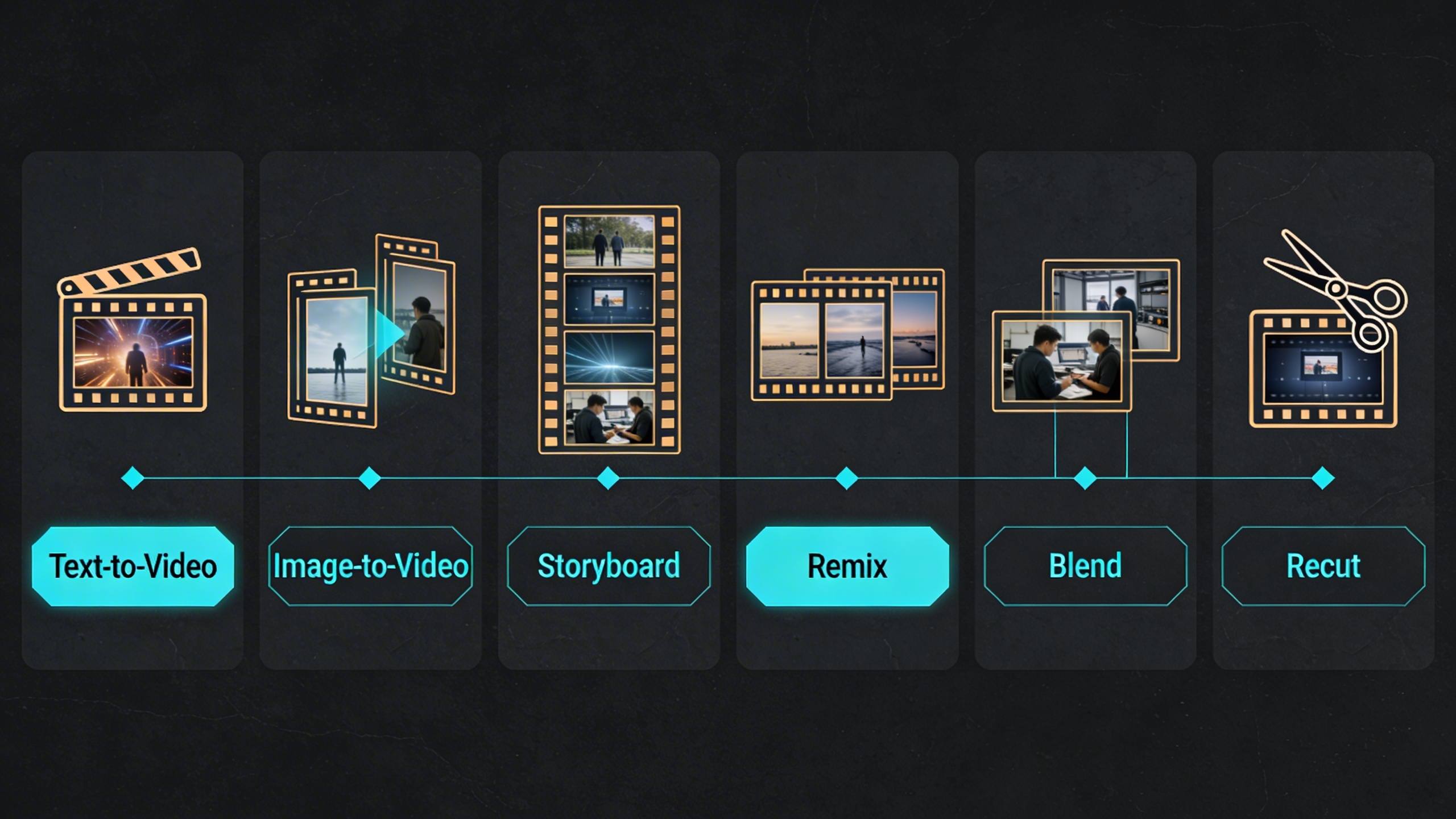
Capability map: the current Sora 2 workflow is strongest when you treat these tools as connected stages rather than isolated buttons.
Where Sora 2 Still Struggles
This is the part many “complete guides” skip. You should not.
Based on official product documentation, release notes, and current user feedback, the main limits are not mysterious. They are fairly consistent:
1. Long-form continuity is still the hard problem
Short clips are the native strength. Longer scenes with stable identity, stable camera logic, and stable object behavior are much harder. If you try to force one clip to carry too many story beats, you often get:
- visual drift
- awkward temporal jumps
- style inconsistency across moments
- a result that feels like multiple shots pretending to be one
This is why storyboard and recut matter so much. They are not optional bonus tools. They are the practical answer to the continuity problem.
2. Prompt complexity can backfire
Community testing repeatedly points to the same pattern: concise prompts with a clean scene objective often outperform sprawling cinematic briefs full of layered modifiers. Sora 2 can interpret rich language, but there is a threshold where too many stacked requirements start fighting each other.
The common failure modes are:
- too many subjects
- too many simultaneous actions
- conflicting camera instructions
- inconsistent style cues
- overstuffed environment details
3. Precision timing is not the same as precision editing
Storyboard improves control, but it does not turn Sora into a timeline editor. You can strongly guide pacing and transitions, yet exact second-by-second choreography still takes iteration. If your use case depends on frame-accurate timing, you still need downstream editing discipline.
4. Quality perception can vary more than people expect
Some users report excellent cinematic outputs. Others report over-stylized results, softness, or inconsistent quality across generations, even with similar prompts. That does not mean Sora 2 is weak. It means result variance is still part of the workflow. The right operating assumption is not “my first result will be final.” It is “I need a repeatable selection and refinement process.”
5. Moderation and access constraints shape the real workflow
Official safety materials and community discussions both make it clear that moderation, region rollout, account access, and feature availability affect what users can actually do in practice. A useful Sora 2 workflow is therefore partly creative and partly operational:
- know what the tool allows
- know when a request is likely to be blocked
- know when to pivot to a safer prompt structure
- know when to switch to another model for a different style or use case
The Best Prompting Mindset for Sora 2
The most common mistake is writing prompts as if more adjectives automatically mean more control.
In practice, the best Sora 2 prompts usually have five layers, in this order:
- Subject: who or what is on screen
- Action: what changes over time
- Camera: how the viewer experiences that motion
- Environment: where the scene happens
- Finish: visual style, lighting, texture, and mood
Here is a clean prompt formula that works better than keyword piles:
Subject + action + camera behavior + environment + visual finish + output intent
For example, compare the difference:
Weak prompt:
cinematic futuristic amazing robot city neon epic beautiful high quality
Stronger prompt:
A service robot walks alone through a rain-soaked alley at night while the camera slowly tracks backward at chest height. Neon signs reflect on the wet pavement, steam rises from street vents, and passing light flickers across the robot's faceplate. The scene should feel quiet, reflective, and slightly melancholic, like a premium teaser shot for a sci-fi film.
The second version is better because it defines:
- the subject
- the motion
- the camera logic
- the environment
- the emotional target
- the intended visual use
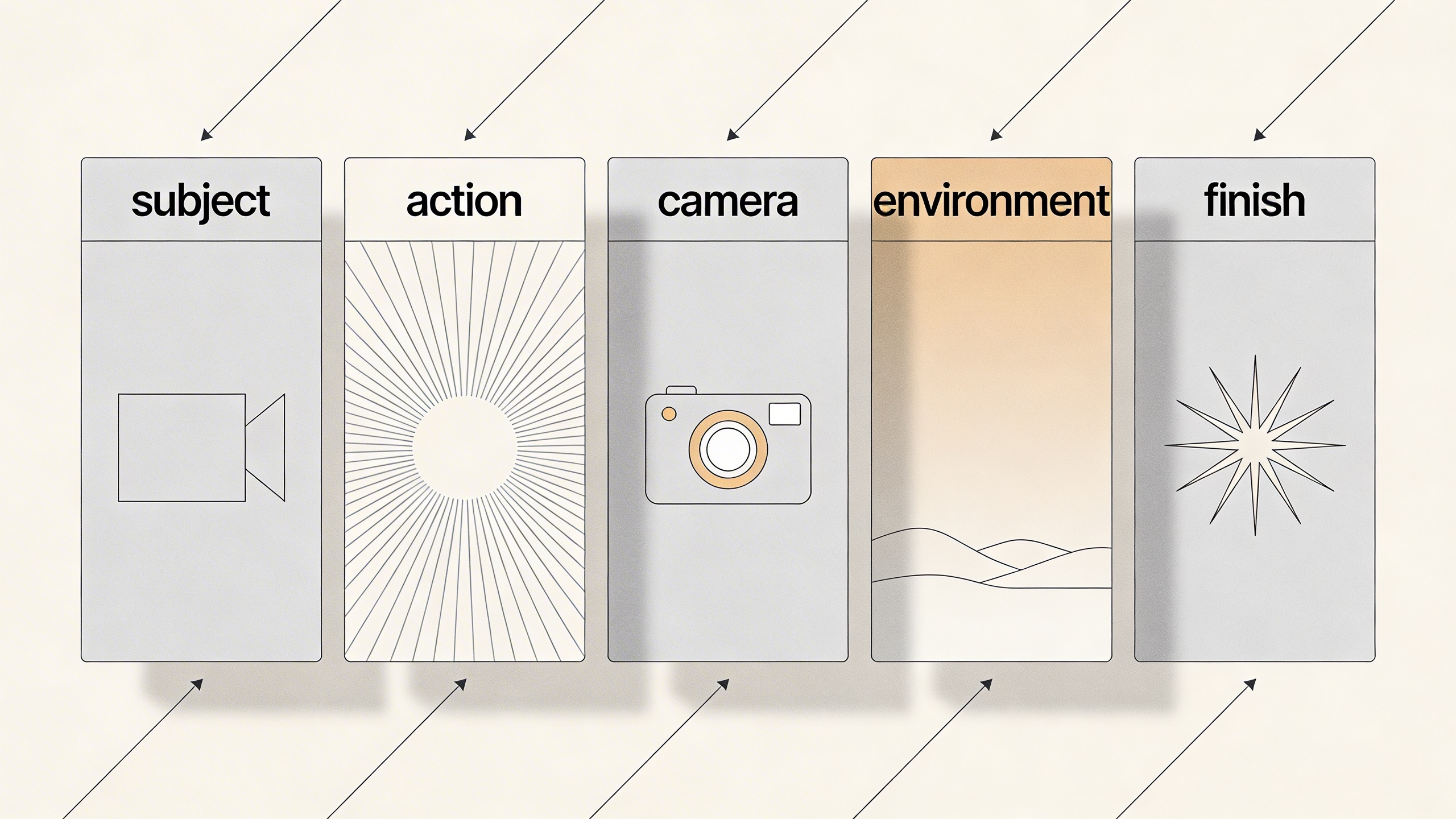
Prompt framework: better Sora 2 results usually come from clear scene structure, not from stacking more adjectives.
A Better Prompt Checklist
Before generating, check whether your prompt answers these questions:
- Is there one primary subject?
- Is the motion clear and visually observable?
- Is the camera behavior realistic for the scene?
- Does the environment support the story instead of competing with it?
- Is the style direction coherent rather than stacked?
- Would a stranger know what the main shot is supposed to be?
If you cannot answer yes to most of those, revise before you render.
How to Use Storyboard Without Making the Video Worse
Storyboard is one of the most important additions in the current Sora workflow. It gives you a way to structure a short video in beats instead of leaving every transition to chance. But it only helps if you respect pacing.
Official guidance highlights an important point: when storyboard cards are packed too tightly, you increase the chance of harsh cuts. That one detail explains many failed generations. People often think the model is “bad at storytelling,” when the real issue is that the story beats were compressed too aggressively.
The simplest storyboard rule
Leave enough space between moments so the model has room to connect them.
That means:
- fewer cards for simpler scenes
- wider spacing between beats
- one scene objective per card
- less dialogue in the prompt, more visual action
- transitions that feel motivated instead of forced
A practical storyboard workflow
- Start with the ending feeling you want, not the first visual.
- Break the scene into two to four beats only.
- Give each beat a visual job.
- Leave transition space.
- Generate multiple variations.
- Keep the strongest structural take, then remix or recut.
Here is a useful way to think about the editing tools around storyboard:
| Tool | Best use | Bad use |
|---|---|---|
| Storyboard | Planning beats, transitions, and pacing | Over-specifying every micro-action |
| Recut | Saving a strong segment and extending it | Trying to repair a fundamentally weak idea |
| Remix | Exploring style or content variants | Rebuilding a broken composition from scratch |
| Blend | Connecting related visual worlds | Forcing unrelated inputs to coexist |
| Loop | Extending calm repeatable motion | Fixing a clip with abrupt or chaotic motion |
Best Settings by Goal
A “good” setting depends on what you are making. People often ask for the highest quality setting by default when what they really need is the fastest route to a decision.
Use this table as a decision shortcut.
| Goal | Recommended starting setup | Why it works |
|---|---|---|
| Ad concept test | 16:9, short duration, 2-4 variations, concise prompt | Lets you compare direction before polishing |
| Social teaser | 9:16 or 1:1, short duration, strong hook in the first beat | Optimizes for feed impact and fast iteration |
| Product hero motion | Start from image input, gentle camera motion, controlled lighting language | Preserves product structure better than open-ended text-only generation |
| Ambient loop | Loop-friendly source scene, restrained motion, clean background logic | Improves repeatability and reduces visual jumpiness |
| Storyboard concept | 2-4 cards, spacious pacing, one action per card | Gives the model room to connect narrative beats |
| Style exploration | Text-to-video first, remix the best result later | Separates ideation from refinement |
A good operating sequence
If you want more keepable results, work in this order:
- Generate for direction.
- Select for structure.
- Recut for pacing.
- Remix for creative improvement.
- Export for editing.
Do not reverse that order unless you enjoy paying the iteration tax twice.
When to Use Text-to-Video vs Image-to-Video
This decision changes everything.
Use text-to-video when:
- you are exploring from zero
- you want unexpected visual ideas
- you are testing mood, setting, or character direction
- you are still deciding what the scene should be
Use image-to-video when:
- you already have a strong keyframe
- product shape or layout must stay recognizable
- you need tighter art direction
- you want movement added to a finished still
For commercial work, image-to-video is often the more reliable path because it narrows the model’s job. Instead of inventing the entire world, the model mainly has to animate and elaborate on a chosen frame.
That distinction matters even more if you are building repeatable output systems for:
- ads
- landing pages
- ecommerce product visuals
- storyboards
- brand world exploration
- campaign mood films
A Production Workflow That Actually Ships
This is where many teams get stuck. They learn how to generate clips, but not how to turn those clips into a working content pipeline.
The better approach is to treat Sora 2 as one layer in a broader production system.
Stage 1: Define the output job
Do not start with “make something cool.” Start with one of these:
- 6-second paid social opener
- landing page hero loop
- product narrative teaser
- storyboard draft for internal review
- visual style proof of concept
Stage 2: Pick the right generation mode
- text-to-video for exploration
- image-to-video for control
- storyboard for narrative pacing
- remix for branching
- recut for rescue and extension
Stage 3: Generate options, not certainty
Assume you need several variations before you find the keeper. This mindset improves quality because you stop expecting one-shot perfection and start optimizing for selection.
Stage 4: Promote winners into an editing workflow
The best Sora teams do not ask the generator to solve every final-delivery problem. They use it to produce strong components:
- attention hooks
- hero motion
- transition moments
- emotional beats
- visual experiments
Then they finish the package in a proper editing workflow.
Stage 5: Standardize what worked
When a prompt, storyboard rhythm, or remix pattern works, save it. The fastest teams are not always the most creative teams. They are often the teams with the best retrieval habits.

Production workflow: the most reliable Sora 2 setup is a repeatable chain of ideation, generation, review, refinement, and export rather than a one-shot prompt.
Why a Multi-Model Workflow Matters More Than Ever
One of the most practical lessons from current AI video work is that no single model wins every job.
That is why a one-model mindset becomes limiting so quickly. Some jobs demand:
- faster draft speed
- stronger prompt following
- better stylization
- different motion behavior
- better image generation for keyframes
- easier switching between image and video workflows
This is exactly where Sora 2 Video Generator becomes strategically useful. Instead of forcing every task into one model’s strengths and weaknesses, it gives you a unified place to work across multiple leading video and image models with a much simpler operating surface. That matters for creators because the real production bottleneck is often not generation quality alone. It is workflow fragmentation.
If your actual day-to-day process includes concepting, keyframe creation, video generation, revision, and asset export, a one-stop setup is usually worth more than a “pure” single-model workflow.
A Realistic Verdict on Sora 2
Sora 2 is impressive, but it is not magical. It is best understood as a high-upside short-form video system with meaningful control improvements, not as a finished replacement for every part of video production.
Its biggest strengths right now are:
- short cinematic generation
- improved creative control through storyboard and edit tools
- strong inspiration and remix workflows
- image, video, and text input flexibility
- practical usefulness for concepting, teasers, and visual exploration
Its biggest weaknesses right now are:
- long-form continuity
- high-precision timing
- result variance
- moderation and rollout constraints
- the need for disciplined iteration rather than one-shot prompting
That does not make it overhyped. It makes it tool-shaped. Once you understand the shape, the value becomes much easier to unlock.
Final Take
If you came here looking for a single sentence verdict, here it is:
Sora 2 is at its best when you treat it like a creative system for short, controlled, iterated video moments rather than a push-button movie machine.
That framing fixes a lot of frustration. It helps you choose better prompts, build cleaner storyboards, make better use of remix and recut, and keep your expectations aligned with what the current generation of AI video tools can actually deliver.
And if you want to apply those lessons in a production-friendly way, Sora 2 Video Generator is a strong place to do it because it reduces the operational mess. You can move faster between leading video and image models, keep your workflow in one place, and turn experimentation into a repeatable system instead of a scattered set of tabs.
Sora 2 FAQ
Is Sora 2 mainly for filmmakers?
No. It is useful for filmmakers, but also for marketers, founders, social teams, ecommerce operators, and designers. Its current sweet spot is short-form visual communication, not only cinematic storytelling.
Is Sora 2 better for text prompts or source images?
It depends on the job. Text prompts are stronger for open exploration. Source images are stronger when layout, product shape, or visual identity need to stay more stable.
Does storyboard guarantee better results?
No. Storyboard gives you more control, but it can also make results worse if you compress too many events into too little time. Good pacing is still essential.
Can Sora 2 replace a full editing workflow?
Not usually. It is better used as a generation and iteration layer inside a broader production process.
What is the smartest first use case for beginners?
A short ad concept, a landing page hero loop, or a single-scene visual teaser. These formats let you learn the system without getting trapped by long-form continuity problems too early.